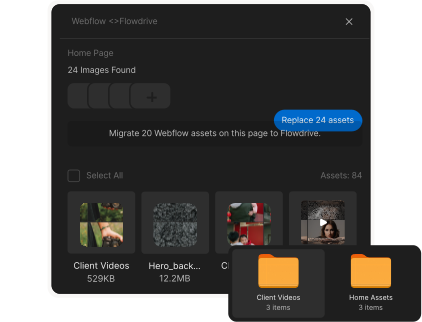
Video hosting for Webflow, without Vimeo or Wistia.
Seven ways to put video on a Webflow site, compared honestly: two native Webflow apps, three usage-based streaming services, and when Wistia or Vimeo is still the right call.



















The short answer
Updated October 2026
The best Vimeo or Wistia alternative for a Webflow site is a native Webflow app: Flowdrive or Vidzflow. Both install from the Webflow Marketplace and insert videos from the Designer, with no embed code. Flowdrive also hosts your files (PDFs, images, downloads), serves everything from your own domain, and prices by requests from $19 a month. Vidzflow is video-only, adds in-video forms and analytics, and caps each video at 1 GB and 20 to 60 minutes, from $12 a month. For the lowest cost at very high traffic, Bunny Stream and Cloudflare Stream bill by usage but need custom embeds. Wistia ($79 a month for Business) is still the strongest for lead capture and CRM-connected video analytics.
Seven options, side by side.
| Option | Webflow setup | Pricing | Best for |
|---|---|---|---|
| Flowdrive | Native Webflow app: insert videos and files from the Designer. Approved on the Webflow Marketplace. | Free plan. Paid from $19 a month, priced by requests, with $0.05 per 1,000 over the plan. No per-video count or length caps. | Webflow sites that host video and files together, served from their own domain. |
| Vidzflow | Native Webflow app. | Free plan. Paid $12, $19 or $39 a month. | Marketing video with in-video forms, CTA buttons and engagement analytics. |
| Bunny Stream | Embed code you add to the page. | Usage-based: you pay per GB stored and per GB delivered. | Lots of video or high traffic on a tight budget. |
| Cloudflare Stream | Embed code or a custom player. | Usage-based: billed per minute of video stored and per minute watched. | Very high-traffic sites with a developer on hand. |
| Mux | Developer integration. | Usage-based. | Custom video experiences built on an API. |
| Wistia | Embed code. | Free plan (25 GB storage, 200 GB bandwidth). Business $79 a month billed yearly (250 GB, 1 TB bandwidth, 3 seats, then $25 per seat). | Marketing teams that want video analytics, lead capture and CRM integrations. |
| Vimeo | Webflow’s video element or embed code. | Free plan, then paid plans priced per seat. | General ad-free video hosting with up to 4K playback. |
Who each one is right for.
Flowdrive
Best for: Webflow sites that host video and files together, served from their own domain.
Watch out for: Largest file is 100 MB on Basic (1 GB on Pro, up to 5 GB). No in-video forms or lead capture.
See Flowdrive video hostingVidzflow
Best for: Marketing video with in-video forms, CTA buttons and engagement analytics.
Watch out for: Video only. Up to 1 GB and 20 to 60 minutes per video, and 25 to 100 videos depending on the plan.
Flowdrive vs Vidzflow in detailBunny Stream
Best for: Lots of video or high traffic on a tight budget.
Watch out for: You set up and maintain the embeds yourself.
Cloudflare Stream
Best for: Very high-traffic sites with a developer on hand.
Watch out for: Developer-oriented setup.
Mux
Best for: Custom video experiences built on an API.
Watch out for: Needs development work to use on a Webflow site.
Wistia
Best for: Marketing teams that want video analytics, lead capture and CRM integrations.
Watch out for: Bandwidth caps per plan, and the price climbs with seats and lead features.
Vimeo
Best for: General ad-free video hosting with up to 4K playback.
Watch out for: Self-serve plans cap bandwidth at 2 TB a month. Video only.
We found Flowdrive solves a major issue for enterprise-grade Webflow sites: high traffic and bandwidth usage. Instead of upgrading to an Enterprise plan, use Flowdrive.


Vimeo and Wistia alternatives, answered.
What is the best Vimeo alternative for Webflow?
For a Webflow site, start with a native Webflow app: Flowdrive or Vidzflow. Both install from the Webflow Marketplace and let you insert videos from the Designer. Choose Flowdrive if you also host files (PDFs, images, downloads) and want everything served from your own domain; choose Vidzflow if you need in-video forms and engagement analytics. For the lowest cost at very high traffic, Bunny Stream and Cloudflare Stream are usage-based but need custom embeds.
What is the best Wistia alternative for Webflow?
If you use Wistia mainly to host and play video on a Webflow site, Flowdrive or Vidzflow cost less and work as native Webflow apps. Flowdrive paid plans start at $19 a month and Vidzflow at $12, against $79 a month (billed yearly) for Wistia Business. Stay on Wistia if you depend on its lead capture, lead scoring and CRM integrations.
Is there a native Webflow app for video hosting?
Yes. Flowdrive and Vidzflow are both apps on the Webflow Marketplace. You connect them in the Designer and insert videos onto your pages without pasting embed code. Vimeo, Wistia, Bunny Stream, Cloudflare Stream and Mux are added with embed code or a custom integration.
Can Webflow host videos itself?
Not standard videos. Webflow’s Assets panel doesn’t take regular video uploads; its background video element takes short, muted, looping clips (about 30 MB). For everything else, Webflow embeds video from a host such as Flowdrive, Vidzflow, Vimeo or Wistia.
How much does video hosting for Webflow cost?
Flowdrive has a free plan, with paid plans from $19 a month priced by requests. Vidzflow has a free plan, with paid plans at $12, $19 and $39 a month. Wistia Business is $79 a month billed yearly. Bunny Stream, Cloudflare Stream and Mux bill by usage, which is cheapest at high traffic but varies month to month.
Does Flowdrive host files as well as video?
Yes. Flowdrive hosts videos, PDFs, images, audio and any other file in one library, serves them from your own domain on paid plans, and can add file upload fields to your Webflow forms. Vidzflow, Vimeo and Wistia host video only.
Built for Webflow. Trusted by agencies.
Install it once, migrate and replace assets in seconds. Manage videos, files, and uploads without ever leaving the designer.